Advertisement
Modules are the core features of Aoba Client. Each module can be individually enabled or disabled, providing specific functionality such as flying, ore detection, combat assistance, and more.
Modules can be toggled in four ways:
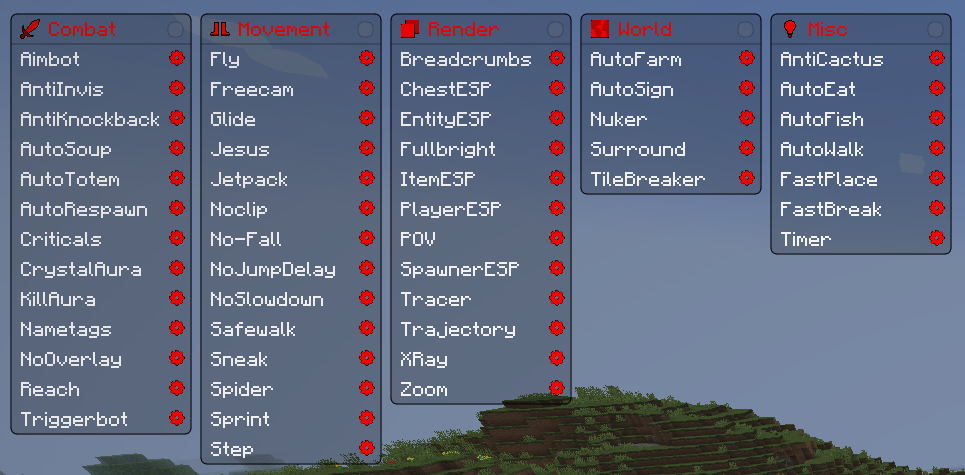
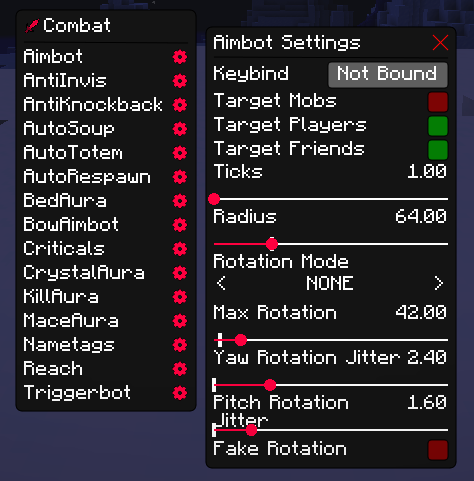
Each module has its own configuration that can be accessed through the ClickGUI. Next to every module name is a gear icon that opens a dedicated settings window for that module. These settings allow you to fine-tune the module's behavior, such as adjusting ranges, speeds, targets, and other module-specific options. All settings persist across game sessions, so you only need to configure them once.
⚠ Disclaimer: Most servers run anti-cheat plugins. Modules must be properly tuned through their settings to avoid detection.
Be aware of which modules you are using and adjust their values accordingly to minimize the risk of bans.
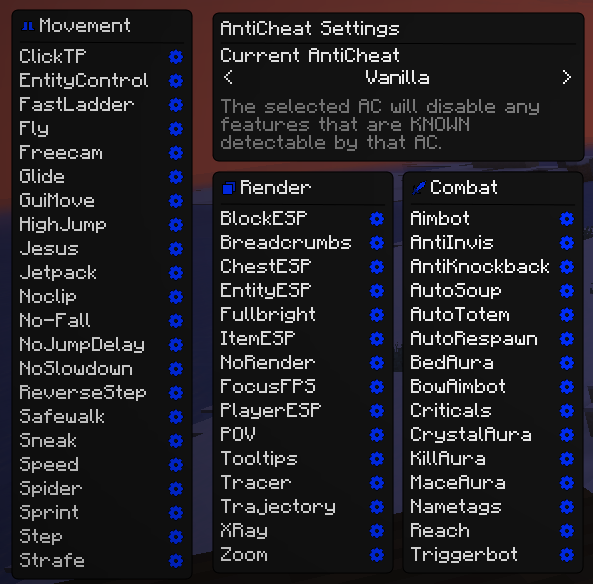
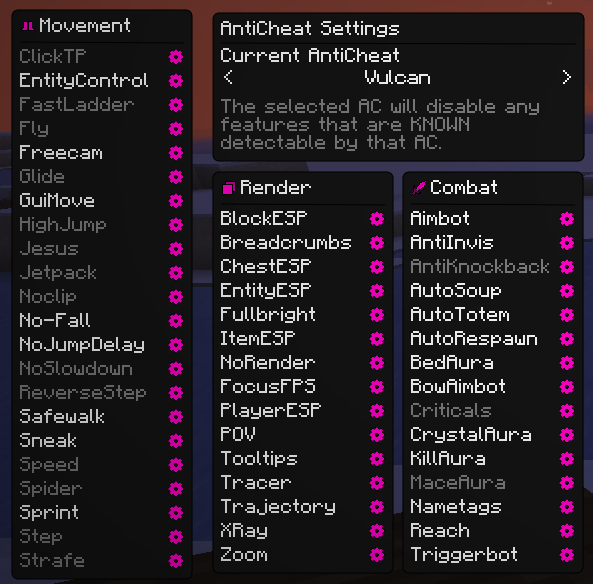
The ClickGUI includes an Anticheat Window, which contains a list of known server-side anticheats. Each anticheat entry displays all modules that are detectable by that specific anticheat plugin. When you select an anticheat from the list, Aoba will automatically disable any modules that are known to be flagged by it, helping to protect you from accidental bans.
Simply select the AntiCheat that the server is running and Aoba will handle the rest by restricting modules that would otherwise get you detected. You can switch between anticheats at any time, and the module restrictions will update accordingly.
| Module | Description |
|---|---|
| Aimbot | Automatically aims at nearby entities |
| AntiInvis | Reveals invisible players and entities |
| AntiKnockback | Reduces or eliminates knockback from attacks |
| AutoRespawn | Instantly respawns upon death |
| AutoSoup | Automatically consumes soup for health regeneration |
| AutoTotem | Automatically equips totems of undying |
| BedAura | Automatically breaks nearby beds |
| BowAimbot | Automatically aims based on projectile velocity |
| Criticals | Forces critical hits on every attack |
| CrystalAura | Automatically places and detonates end crystals |
| KillAura | Automatically attacks nearby entities |
| MaceAura | Automatically attacks using mace mechanics |
| Nametags | Enhances nametags with additional information |
| Reach | Increases reach distance for blocks and entities |
| TriggerBot | Attacks entities when crosshair is over them |
| Module | Description |
|---|---|
| ClickTP | Teleport to where you click |
| EntityControl | Take control of ridden entities |
| FastLadder | Increases ladder climbing speed |
| Fly | Enables creative-like flight in survival mode |
| Freecam | Detaches camera from player for free exploration |
| Glide | Slows falling speed for controlled descent |
| GuiMove | Allows movement while GUIs are open |
| HighJump | Increases jump height |
| Jesus | Walk on water and lava surfaces |
| Jetpack | Provides vertical flight with customizable speed |
| Noclip | Walk through solid blocks |
| NoFall | Prevents fall damage |
| NoJumpDelay | Removes delay between jumps |
| NoSlowdown | Prevents slowdown from soul sand, items, etc. |
| ReverseStep | Instantly descend full blocks |
| Safewalk | Prevents falling off edges |
| Sneak | Toggles sneaking for safe edge building |
| Speed | Increases movement speed |
| Spider | Climb walls like a spider |
| Sprint | Automatically sprints when moving forward |
| Step | Steps up full blocks without jumping |
| Strafe | Maintains momentum while strafing |
| Module | Description |
|---|---|
| BlockESP | Highlights specific blocks through walls |
| Breadcrumbs | Renders a trail showing your movement path |
| ChestESP | Highlights storage containers through walls |
| EntityESP | Highlights all entities through walls |
| FocusFps | Reduces rendering when the game is unfocused |
| Fullbright | Removes darkness by maximizing brightness |
| ItemESP | Highlights dropped items through walls |
| NoRender | Disables rendering of specific game elements |
| PlayerESP | Highlights players through walls |
| POV | View another player or mob's point of view |
| Tooltips | Enhances item tooltips with additional information |
| Tracer | Draws lines to entities for tracking |
| Trajectory | Shows predicted path of projectiles |
| XRay | Makes selected blocks visible through walls |
| Zoom | Provides adjustable zoom function |
| Module | Description |
|---|---|
| AutoFarm | Automatically harvests and replants crops |
| AutoSign | Automatically writes text on placed signs |
| Nuker | Breaks multiple blocks simultaneously |
| Scaffold | Automatically places blocks beneath you while walking |
| Surround | Places blocks around player for protection |
| TileBreaker | Breaks specified tile entities in range |
| Module | Description |
|---|---|
| AntiCactus | Prevents damage from cacti |
| AntiHunger | Reduces hunger depletion rate |
| AutoEat | Consumes food automatically when hunger is low |
| AutoFish | Automates fishing with catch detection |
| AutoOminousBottle | Automatically uses ominous bottles |
| AutoShear | Automatically shears nearby sheep |
| AutoWalk | Automatically walks in a specified direction |
| DiscordRPC | Displays Aoba Client status on Discord rich presence |
| EXPThrower | Automatically throws experience bottles |
| FakePlayer | Spawns a client-side fake player entity |
| FastBreak | Increases block breaking speed |
| FastPlace | Removes block placement delay |
| MCA | Automated middle-click action |
| RandomPlace | Places blocks in random positions |
| Timer | Modifies game tick speed |
| XCarry | Allows carrying items in crafting grid slots |
Advertisement
